¶ 3.4.1 Function Introduction
- Video upscaling: Capable of increasing video resolution to 1080P or 4K to enhance clarity and detail.
- Quality Improvement: Reduce noise, sharpen details, and improve color accuracy.
- Film Restoration: Restoring the texture of black-and-white films by enhancing details, smoothing grain, and sharpening edges.
- Home Video Enhancement: Improve homemade videos by increasing resolution, sharpening focus, and adjusting color saturation.
¶ 3.4.2 Parameter Settings
¶ Model
The cloud Upscaler currently supports the following models:
1. Equinox (General Enhancement Model)
Equinox is a general-purpose video enhancement model that balances processing speed and output quality, making it suitable for most use cases.
Best for
- Daily recorded videos (mobile / camera)
- Online videos, short clips, and creative content
- Users who prefer fast and stable enhancement
Features:
- Balanced mode: optimized for both speed and quality
- Works well across various video types
- Reliable and consistent results
2. Titanus (Cinematic Enhancement Model)
Titanus is a high-quality enhancement model optimized for cinematic and film content. It was originally a local model and has been upgraded for cloud deployment.
Best for:
- Movies, TV shows, and cinematic content
- Professional or high-quality footage
- Users who prioritize maximum visual quality
Features:
- Optimized for film and cinematic scenarios
- Enhanced detail restoration and image clarity
- Currently supports 4x upscaling only
Notes:
- Uses the same credit calculation rules as Equinox
- Processing time may be longer due to higher complexity
¶ Resolution Options
The cloud version supports resolution options similar to the local version:
- Supports 1x, 2x, and 4x upscaling (depending on the model)
- Higher output resolution results in:
- Longer processing time
- Higher credit consumption
Audio Output
- Only original audio is preserved
- No audio enhancement options are available
- Audio upmixing is not supported
¶ 3.4.3 Instructions for Use
File size limit: 10GB
The cloud Upscaler feature consumes credits, and the specific credit consumption depends on the selected resolution, as detailed below.
Credits = Duration (minutes) × Resolution Tier × Upscale Factor × Frame Rate Factor
- Video duration will be rounded up and down, with durations over 30 seconds counted as 1 minute
- Input Resolution (Tier) Higher input resolution results in higher credit consumption:
| Gear Name | Points consumed per minute | Examples of typical resolutions |
| SD (Standard Definition) | 0.5 credits | 480p, 576p, 640x480, 720x576, standard 720p (1280x720) |
| HD (High Definition) | 1.0 points | 900p, 960p, standard 1080p, 1080x1920 (portrait), 1920x1200 (16:10) |
| 2K (Ultra HD) | 2.5 credits | 1440p (2K), 2048x1536 (iPad), 2560x1600 |
| 4K (Ultra High) | 5.0 Points | 2160p (4K) |
- Output Resolution (Upscale Level) Higher output resolution increases credit consumption:
- Moderate upscale (e.g., 1080p → 1440p) → Slight increase
- Large upscale (e.g., 720p → 4K) → Significant increase
- Frame Rate (fps)
- Higher frame rate increases processing cost
- Frame Rate Factor = Input FPS ÷ 24
- Rounding Rules
- Final credits are rounded to the nearest 0.5
- Example
- A 5-minute, 1080p, 30fps video upscaled to 1440p:
- Standard resolution input
- Moderate upscale
- Slightly higher frame rate
- Final cost: approximately 7.5 credits
- Suitable for users with limited device performance or those who wish to save local computing resources.
- The processing flow is completed in the cloud, and the speed is affected by network conditions. It is recommended to use it when the network conditions are good.
- Supports batch processing to improve usage efficiency.
¶ 3.4.4 Operating Steps
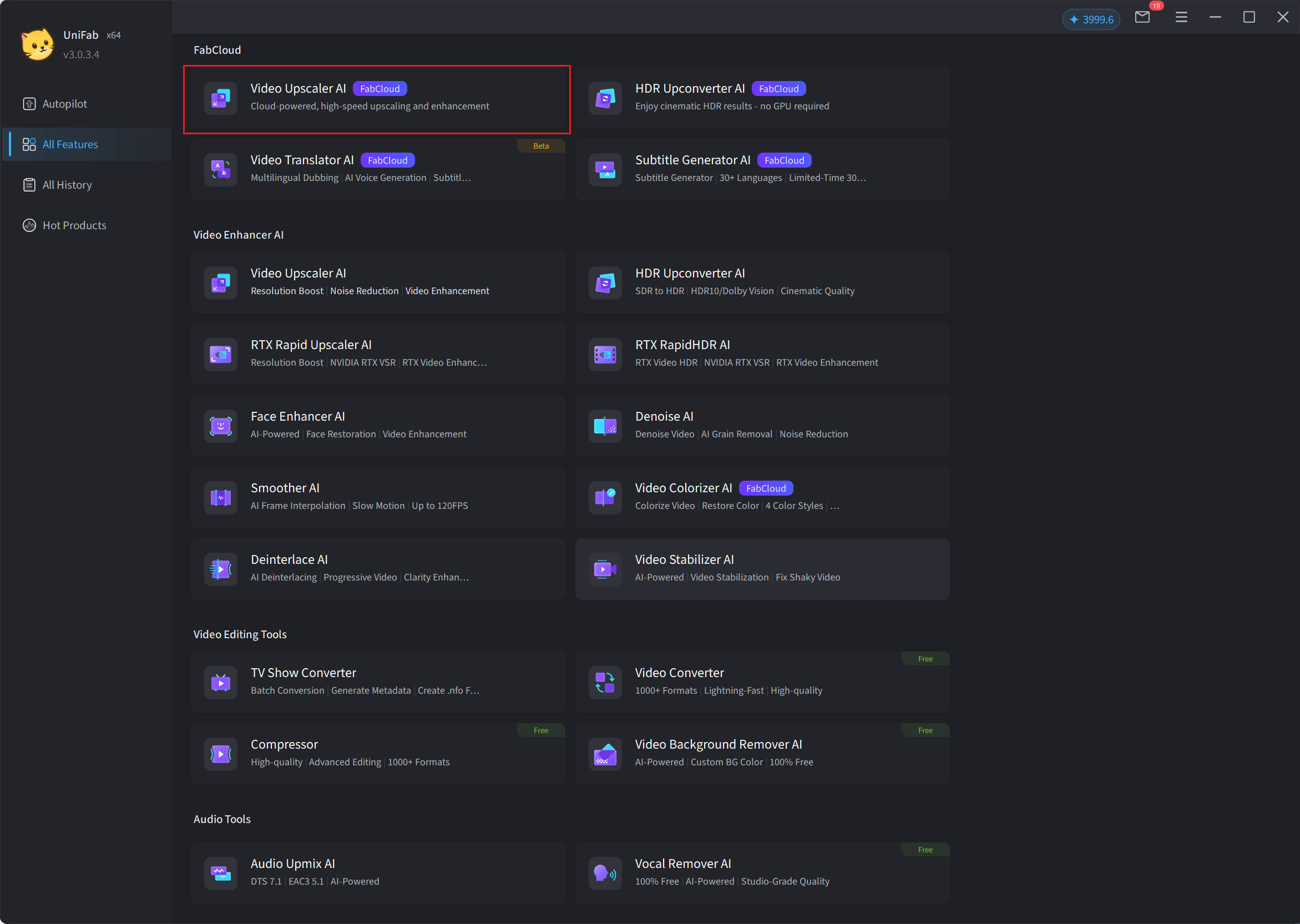
Step 1: Open UniFab and select "Video Upscaler AI FabCloud"
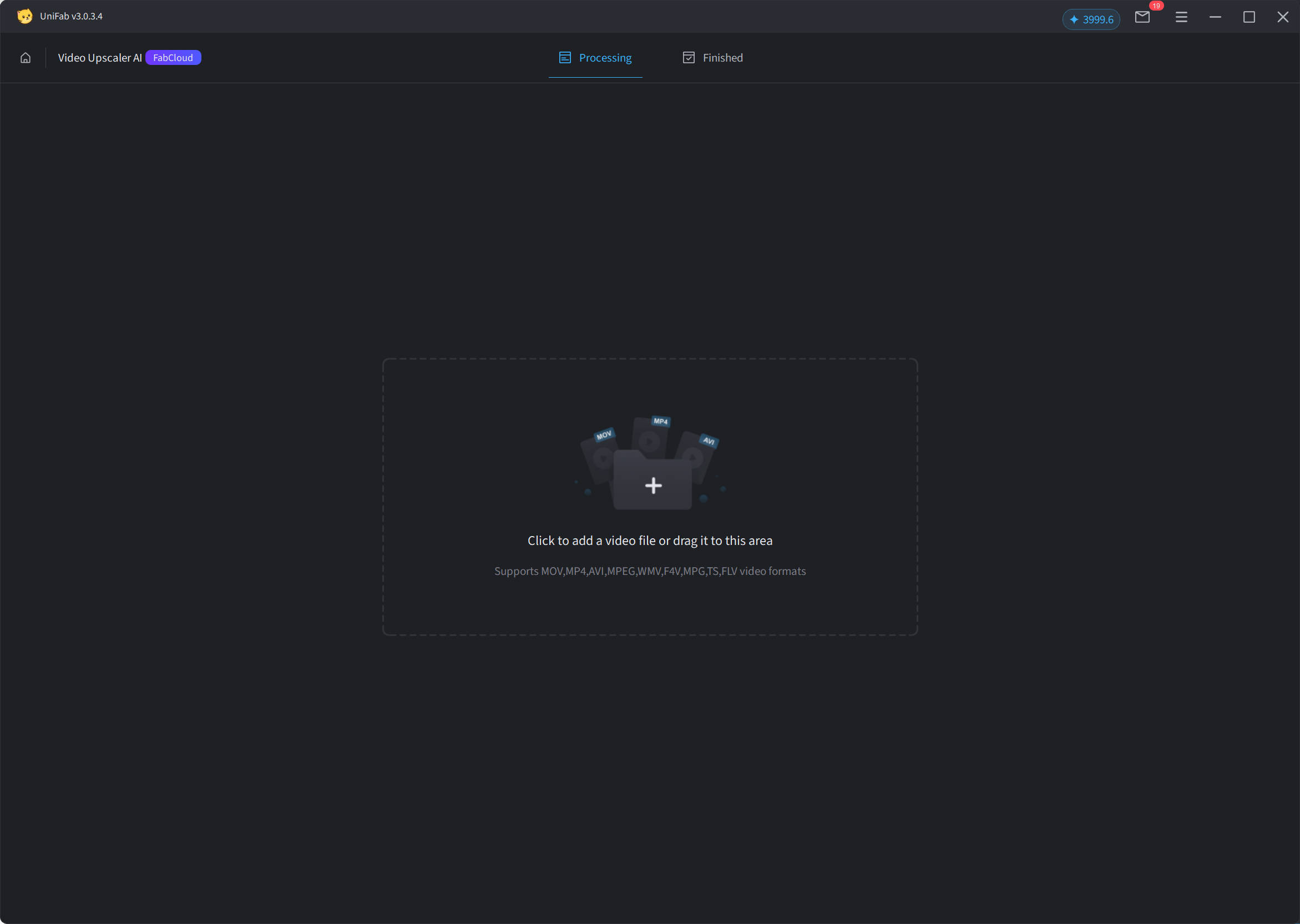
Step 2: Import Video
Click the "+" button or drag the file, then select the video you want Upscaler to process.
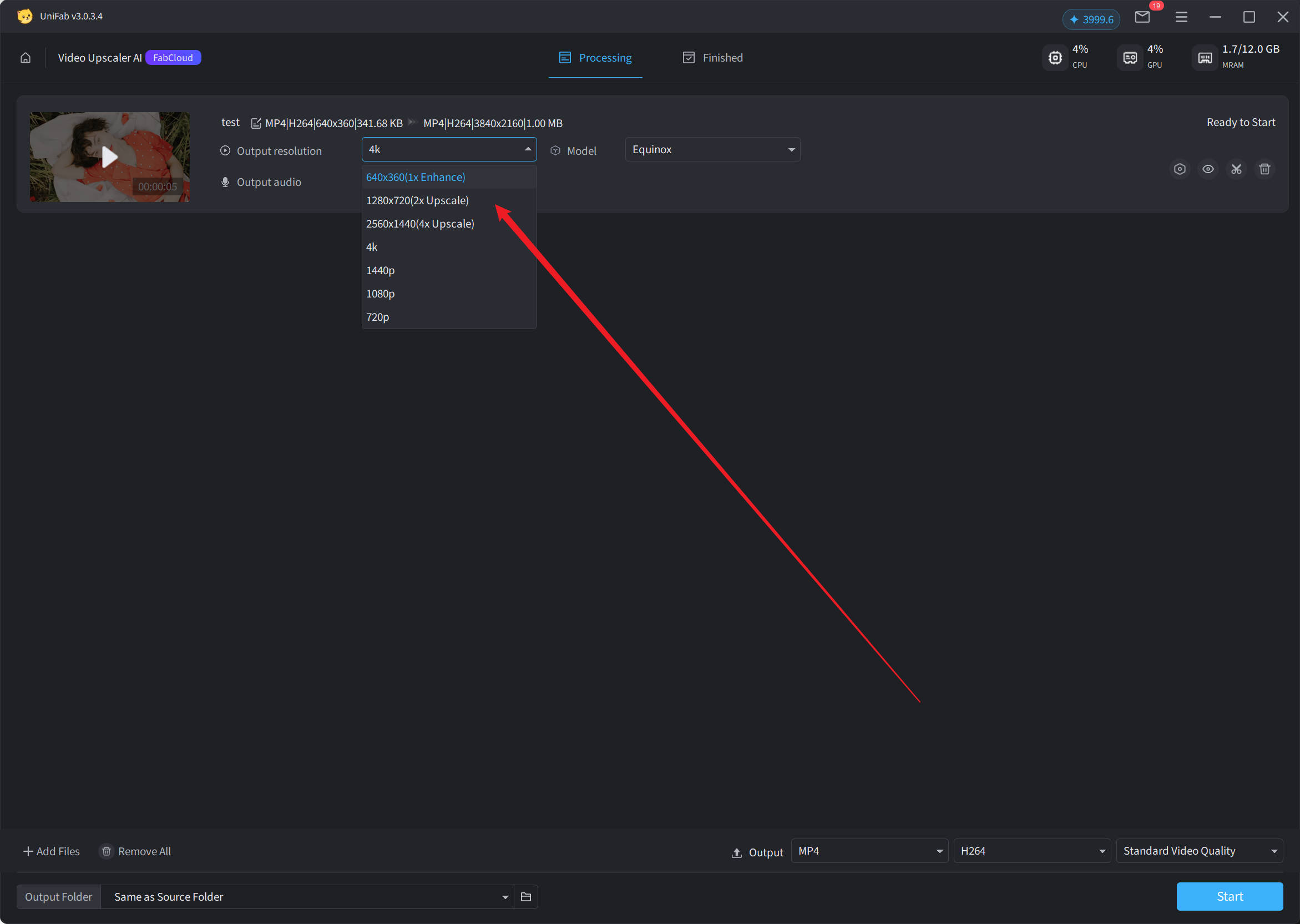
Step 3: Adjust Output Resolution
On the current interface, you can easily adjust the output resolution (e.g., 1080p, 4K. For details on each effect, please refer to 3.4.2 Parameter Settings).
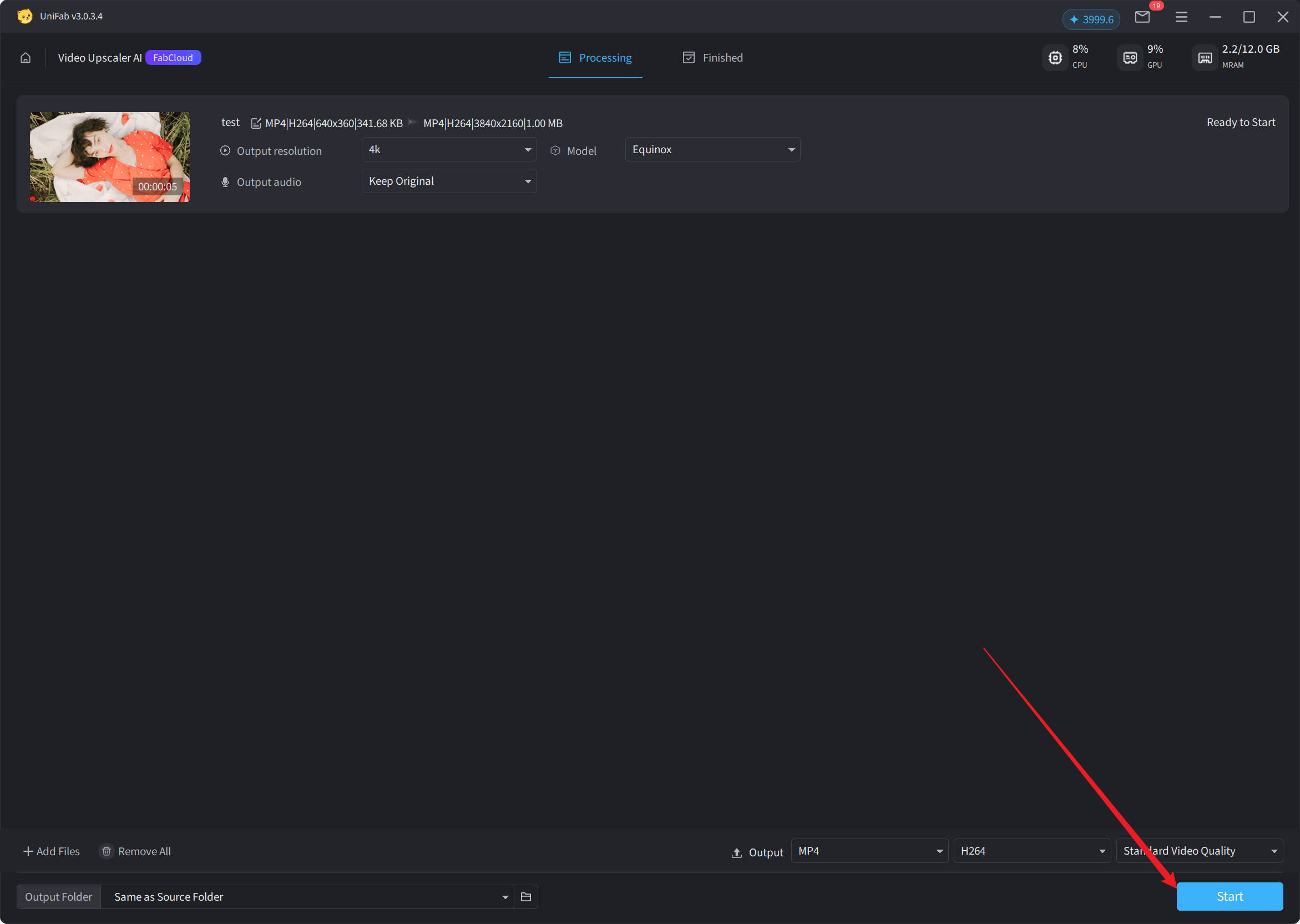
Step 4: Start Processing
Click "Start" to apply the Upscaler effect.
¶ 3.4.5 处理速度Test Example
The following test results are for reference only.
| Source Creative Type | Zoom Type | Processing speed |
| 480p | 2x Enhancement | 112.46 fps/s |
| 720p | 2x Enhancement | 54.06 fps/s |
| 1080p | 2x Enhancement | 38.02 fps/s |
| 1080p | 1x enhancement | 52.4 fps/s |
| 1440p | 1x enhancement | 21.93 fps/s |
| 4k | 1x enhancement | 11.65 fps/s |
| 480p | 4x Enhancement | 39.76 fps/s |
¶ 3.4.6 System Requirements
Cloud processing has lower requirements for local devices, is basically compatible with modern operating systems and browser environments, but is recommended to be used in a stable and high-speed network environment to ensure a good experience.
¶ 3.4.7 常见问题解答
Q1: What are the differences between the cloud version of Upscaler and the local version?
The cloud version is processed by the powerful computing power of the cloud, making it more suitable for users with limited device performance. It only provides the high-quality Equinox model and requires the consumption of points.
Q2: How many credits are required to use the cloud version of Upscaler?
Points consumption is related to the selected resolution; the higher the resolution, the more points are consumed. Please check your points balance before use.
Q3: Will network conditions affect usage?
Yes, cloud processing relies on the network, and an unstable network may cause the processing speed to slow down or fail.
Q4: Does it support batch processing?
Supported, users can submit multiple videos at once for batch processing.
Q5: Are there any restrictions on video format?
The cloud version supports common video formats such as MP4 and MKV. It is recommended to use high-quality source files for optimal results.
Q6: Will the processed video be saved locally?
After processing is completed, you can download the magnified and enhanced video file.
Q7: Can I use the cloud version features if my points are insufficient?
The cloud Upscaler feature cannot be used when credits are insufficient. Please recharge your credits and try again.