¶ 1. Introduction
UniFab VideoRefiner AI is a cloud-based AI video refinement tool designed to process mosaic or block-based visual areas in videos.
By intelligently analyzing compressed or visually obscured regions, the system reconstructs natural-looking details, making the overall image more consistent and visually coherent.
¶ Key Features
- Cloud-Powered — High-performance AI processing architecture in the cloud
- Natural Detail Recovery — Intelligent reconstruction of visually disrupted areas
- Simple Workflow — Upload, process, and download in just a few steps
- Original Audio Preserved — Automatically separates and merges the original audio track
- Multiple Output Formats — Supports MKV / MP4 and H.264 / H.265
Note: This feature focuses on visual detail reconstruction only. It does not provide resolution upscaling or super-resolution enhancement.
¶ 2. System Requirements
¶ Operating System
- Windows 11 / Windows 10 (64-bit only)
¶ Network Requirement
- A stable internet connection is required (cloud processing)
¶ File Size Limit
- Maximum supported file size per video: 10 GB
- If your file exceeds the limit, please compress it before uploading
¶ 3. How to Use
¶ Step 1: Launch UniFab
Open UniFab and navigate to the FabCloud category.
Click VideoRefiner AI (Beta) to enter the feature interface.
.png)
¶ Step 2: Add Video File
Click Add Source to select your video file.
If the file exceeds 10GB, a file size limit notification will appear.
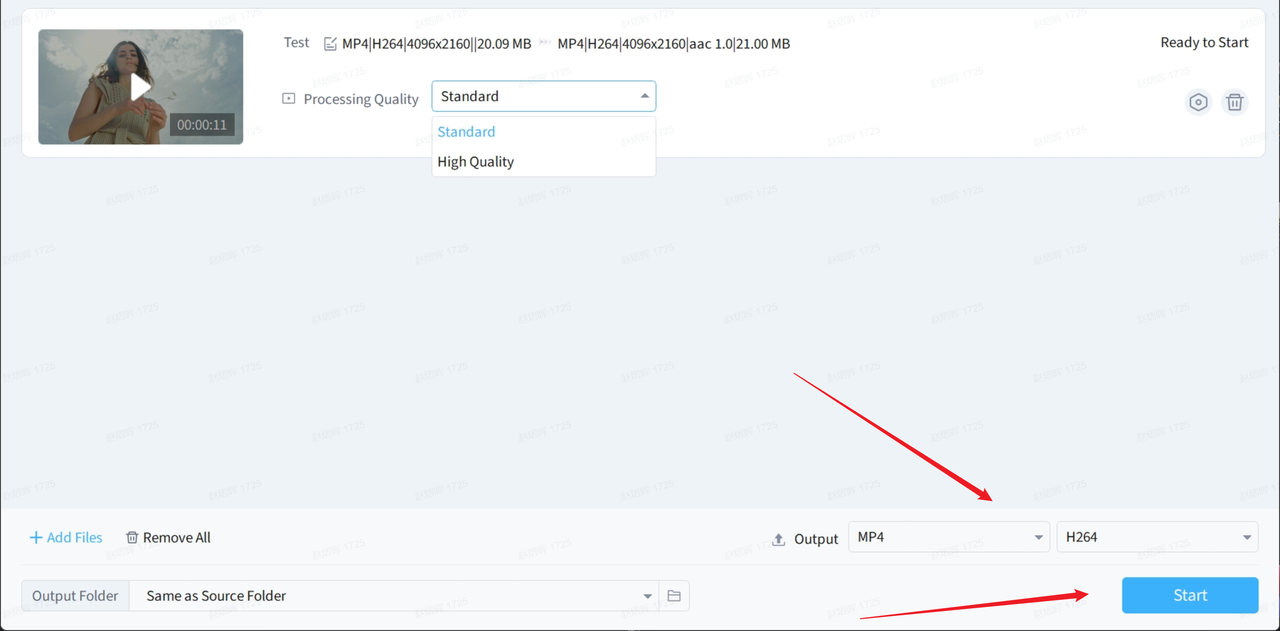
¶ Step 3: Select Processing Quality
Two processing modes are available:
- Standard (Balanced) — Default mode with faster processing speed
- High Quality — Provides more refined detail reconstruction
.png)
¶ Step 4: Set Output Format
Supported output options:
- Format: MP4 / MKV
- Codec: H.264 / H.265
¶ Step 5: Start Processing
Click the Start button.
Processing will be completed in the cloud. You can monitor progress in:
- Finished
- All History
The selected processing quality mode will be displayed in the history list.
¶ 4. Beta Usage Policy
This feature is currently released as a Beta version.
¶ Eligibility
- Available to UniFab paid users only
¶ Usage Limits
- Up to 5 uses
- Maximum total processing time of 600 minutes
If any of the above conditions are not met, a Beta Usage Status notification will appear, displaying:
- Eligibility status
- Remaining uses
- Remaining processing time
¶ 5. Important Notes
- This feature requires a stable internet connection due to cloud processing.
- The original video compression level may affect the final reconstruction results.
- This feature does not modify the original audio track.
- Files larger than 10GB are not supported.
- After the Beta testing period ends, you must update to the latest version to continue using the official release.
¶ 6. Frequently Asked Questions (FAQ)
¶ Q1: Can this feature automatically process mosaic areas in videos?
Yes. The system automatically detects mosaic or block-based visual regions and performs intelligent detail reconstruction.
¶ Q2: Does it increase video resolution?
No. This feature only performs detail reconstruction within the original resolution and does not upscale the video.
¶ Q3: Why is the feature unavailable?
Possible reasons include:
- You are not a UniFab paid user
- The Beta usage limit has been reached
- Remaining processing time is insufficient
¶ Q4: Is my video permanently stored in the cloud?
Videos are uploaded to the cloud only during processing. Once processing is completed, the result is returned to the local client. Please refer to the Privacy Policy for full details.
¶ Q5: Will the official version continue to have usage limits?
The Beta usage limitations will be removed in the official release. Future licensing details will be announced in official updates.